
There are the annoying usual CAPTCHA tests. But there is also a trap that asks you to press a series of keys. And this is a way hackers can install malicious software on your computer.
Maybe you are looking for Christmas gifts and want to support small entrepreneurs when you shop. When you visit the website of such a company – which you have heard good things about – you are asked to confirm that you are a real person.
However, instead of clicking on a series of images or entering some letters displayed on the screen, procedures you have probably encountered before, this time you are asked to press a sequence of keys, followed by the “Enter” key.
This is a tactic known as the “ClickFix” scam, shows Chris Fistonich, a researcher at the cybersecurity company Malwarebytes, quoted by The Guardian.
How to recognize the “ClickFix” scheme
ClickFix is one of the most sophisticated existing malware campaigns, says Fistonich.
“People are not prepared for something like this. They are used to solving CAPTCHA tests every day. They are used to trusting their security software. So, in fact, a new security vulnerability has emerged that is being widely exploited,” he explains.
“This is the most widespread method by which malware can get onto your computer. Certainly not the only one, but currently, it is undoubtedly the most frequent,” the expert explains.
What a fake CAPTCHA test looks like
CAPTCHA tests are known to many people; they are a way for a website to distinguish between real and automated users. Most often, they involve displaying an image and asking the user to perform simple tasks, such as selecting bicycles or trains, or entering numbers shown in a blurry image.
The “ClickFix” fraud works in a similar way. The message may contain the text: “Prove you are a real person by performing the action below.” And you are asked to check a box. Be careful, however: by checking this box, you give the system permission to copy malicious code to your computer’s clipboard.
Next, you will be asked to complete a task: “To prove you are not a robot, please: press and hold the Windows key + R. In the verification window, press Ctrl + V. Press the Enter key on your keyboard to complete the operation.”
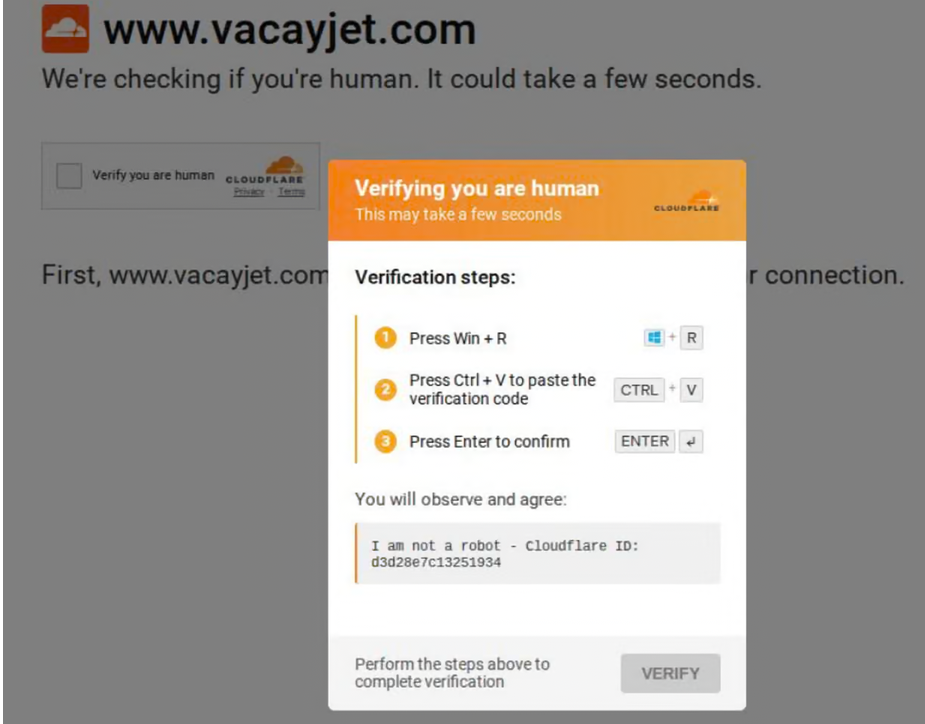
This sequence of actions inserts that text into your system, which leads to your computer becoming infected.
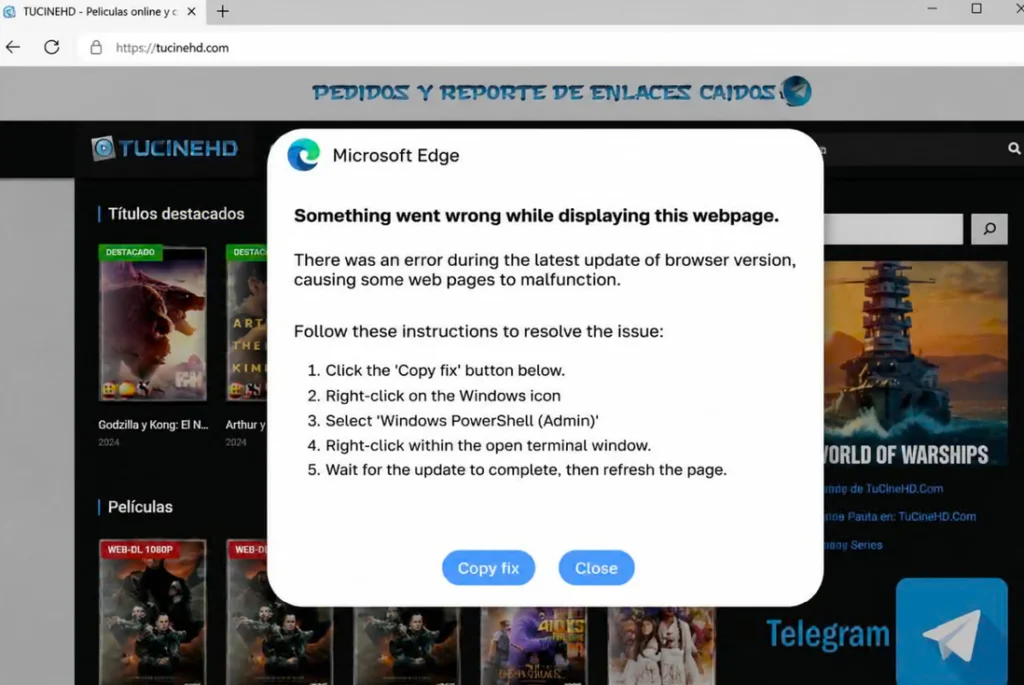
In other variants of the same scheme, you may be told that “an error occurred while displaying this web page,” with similar instructions offered to fix the problem.
What you should do
Like many other scams, the “ClickFix” fraud relies on people acting quickly without carefully analyzing their actions. So, when you encounter a CAPTCHA test, don’t rush: take a break and think about what you are doing whenever you are online.
Some security software solutions can block malicious websites containing malware traps; users should therefore check what protection measures they have installed on their computers.
If you have fallen victim to such a scam, you should immediately contact your bank, the expert recommends. Then, change all your passwords, starting with the most important ones.
T.D.